<!DOCTYPE html>
    <html lang="vi" xmlns="http://www.w3.org/1999/xhtml" prefix="og: http://ogp.me/ns#">
    <head>
<title>TÀI KHOẢN VÀ HƯỚNG DẪN HỌC SINH HỌC ONLINE BẰNG MS TEAMS</title>
<meta name="description" content="TÀI KHOẢN VÀ HƯỚNG DẪN HỌC SINH HỌC ONLINE BẰNG MS TEAMS - Savefile - Tin Tức -...">
<meta name="author" content="Trường THPT  Đỗ Đăng Tuyển">
<meta name="copyright" content="Trường THPT  Đỗ Đăng Tuyển [webmaster@thptnguyentrai.my]">
<meta name="generator" content="NukeViet v4.5">
<meta name="viewport" content="width=device-width, initial-scale=1">
<meta http-equiv="Content-Type" content="text/html; charset=utf-8">
<meta property="og:title" content="TÀI KHOẢN VÀ HƯỚNG DẪN HỌC SINH HỌC ONLINE BẰNG MS TEAMS">
<meta property="og:type" content="website">
<meta property="og:description" content="Savefile - Tin Tức - https&#x3A;&#x002F;&#x002F;thptdodangtuyen.edu.vn&#x002F;savefile&#x002F;tin-nha-truong&#x002F;huong-dan-hoc-sinh-dang-nhap-va-hoc-online-bang-ms-teams-46.html">
<meta property="og:site_name" content="Trường THPT  Đỗ Đăng Tuyển">
<meta property="og:url" content="https://thptdodangtuyen.edu.vn/savefile/tin-nha-truong/huong-dan-hoc-sinh-dang-nhap-va-hoc-online-bang-ms-teams-46.html">
<link rel="shortcut icon" href="https://thptdodangtuyen.edu.vn/uploads/security.jpg">
<link rel="canonical" href="https://thptdodangtuyen.edu.vn/savefile/tin-nha-truong/huong-dan-hoc-sinh-dang-nhap-va-hoc-online-bang-ms-teams-46.html">
<link rel="alternate" href="https://thptdodangtuyen.edu.vn/rss/" title="Tin Tức" type="application/rss+xml">
<link rel="alternate" href="https://thptdodangtuyen.edu.vn/rss/tin-nha-truong/" title="Tin Tức - Tin nhà trường" type="application/rss+xml">
<link rel="alternate" href="https://thptdodangtuyen.edu.vn/rss/tin-giao-duc/" title="Tin Tức - Tin giáo dục" type="application/rss+xml">
<link rel="alternate" href="https://thptdodangtuyen.edu.vn/rss/tin-cong-doan/" title="Tin Tức - Tin công đoàn" type="application/rss+xml">
<link rel="alternate" href="https://thptdodangtuyen.edu.vn/rss/hoat-dong-doan-hoi/" title="Tin Tức - Hoạt động Đoàn - Hội" type="application/rss+xml">
<link rel="alternate" href="https://thptdodangtuyen.edu.vn/rss/tin-ngll/" title="Tin Tức - Hoạt động ngoài giờ" type="application/rss+xml">
<link rel="alternate" href="https://thptdodangtuyen.edu.vn/rss/tin-y-te-thu-vien/" title="Tin Tức - Tin Y tế - Thư viện" type="application/rss+xml">
<link rel="alternate" href="https://thptdodangtuyen.edu.vn/rss/tin-tu-so-gd-dt-tinh-quang-nam/" title="Tin Tức - Tin từ Sở GD&amp;ĐT tỉnh Quảng Nam" type="application/rss+xml">
<link rel="preload" as="style" href="https://thptdodangtuyen.edu.vn/assets/css/font-awesome.min.css" type="text/css">
<link rel="preload" as="style" href="https://thptdodangtuyen.edu.vn/themes/thptnt/css/bootstrap.min.css" type="text/css">
<link rel="preload" as="style" href="https://thptdodangtuyen.edu.vn/themes/thptnt/css/style.css" type="text/css">
<link rel="preload" as="style" href="https://thptdodangtuyen.edu.vn/themes/thptnt/css/style.responsive.css" type="text/css">
<link rel="preload" as="style" href="https://thptdodangtuyen.edu.vn/themes/thptnt/css/news.css" type="text/css">
<link rel="preload" as="style" href="https://thptdodangtuyen.edu.vn/themes/thptnt/css/custom.css" type="text/css">
<link rel="preload" as="style" href="https://thptdodangtuyen.edu.vn/themes/thptnt/css/custom2.css" type="text/css">
<link rel="preload" as="script" href="https://thptdodangtuyen.edu.vn/assets/js/jquery/jquery.min.js" type="text/javascript">
<link rel="preload" as="script" href="https://thptdodangtuyen.edu.vn/assets/js/language/vi.js" type="text/javascript">
<link rel="preload" as="script" href="https://thptdodangtuyen.edu.vn/assets/js/global.js" type="text/javascript">
<link rel="preload" as="script" href="https://thptdodangtuyen.edu.vn/themes/thptnt/js/news.js" type="text/javascript">
<link rel="preload" as="script" href="https://thptdodangtuyen.edu.vn/themes/thptnt/js/main.js" type="text/javascript">
<link rel="preload" as="script" href="https://thptdodangtuyen.edu.vn/themes/thptnt/js/custom.js" type="text/javascript">
<link rel="preload" as="script" href="https://thptdodangtuyen.edu.vn/themes/thptnt/js/bootstrap.min.js" type="text/javascript">
<link rel="stylesheet" href="https://thptdodangtuyen.edu.vn/assets/css/font-awesome.min.css">
<link rel="stylesheet" href="https://thptdodangtuyen.edu.vn/themes/thptnt/css/bootstrap.min.css">
<link rel="stylesheet" href="https://thptdodangtuyen.edu.vn/themes/thptnt/css/style.css">
<link rel="stylesheet" href="https://thptdodangtuyen.edu.vn/themes/thptnt/css/style.responsive.css">
<link rel="StyleSheet" href="https://thptdodangtuyen.edu.vn/themes/thptnt/css/news.css">
<link rel="stylesheet" href="https://thptdodangtuyen.edu.vn/themes/thptnt/css/custom.css">
<link rel="stylesheet" href="https://thptdodangtuyen.edu.vn/themes/thptnt/css/custom2.css">
<style>
	body{background: #fff;}
</style>
    </head>
    <body>
<div id="print">
	<div id="hd_print">
		<h2 class="pull-left">Trường THPT  Đỗ Đăng Tuyển</h2>
		<p class="pull-right"><a title="Trường THPT  Đỗ Đăng Tuyển" href="https://thptdodangtuyen.edu.vn/">https://thptdodangtuyen.edu.vn</a></p>
	</div>
	<div class="clear"></div>
	<hr />
	<div id="content">
		<h1>TÀI KHOẢN VÀ HƯỚNG DẪN HỌC SINH HỌC ONLINE BẰNG MS TEAMS</h1>
		<ul class="list-inline">
			<li>Thứ sáu - 27/08/2021 13:27</li>
			<li class="hidden-print txtrequired"><em class="fa fa-print">&nbsp;</em><a title="In ra" href="javascript:;" onclick="window.print()">In ra</a></li>
			<li class="hidden-print txtrequired"><em class="fa fa-power-off">&nbsp;</em><a title="Đóng cửa sổ này" href="javascript:;" onclick="window.close()">Đóng cửa sổ này</a></li>
		</ul>
		<div class="clear"></div>
		<div id="hometext">
			Nhằm chuẩn bị cho việc học online và trực tuyến năm học 2021-2022, đề nghị học sinh xem hướng dẫn để thực hiện việc học online bằng microsoft teams.
		</div>
		<div id="bodytext" class="clearfix">
			<div style="text-align: justify;"><span style="font-size:12pt"><span style="line-height:107%"><span style="font-family:&#039;Times New Roman&#039;,serif"><span style="font-size:14.0pt"><span style="line-height:107%">&nbsp; &nbsp; &nbsp;Video hướng dẫn: <a href="https://www.youtube.com/watch?v=4UQ3ENlM0vI" style="color:rgb(5, 99, 193); text-decoration:underline">https://www.youtube.com/watch?v=4UQ3ENlM0vI</a> (lưu ý thời gian 15’30 để xem cách nhập mã code vào phòng học).</span></span></span></span></span><br />
<span style="font-size:12pt"><span style="line-height:107%"><span style="font-family:&#039;Times New Roman&#039;,serif"><b><span style="font-size:14.0pt"><span style="line-height:107%">I/ Đăng nhập</span></span></b></span></span></span><br />
<span style="font-size:12pt"><span style="line-height:107%"><span style="font-family:&#039;Times New Roman&#039;,serif"><b><span style="font-size:14.0pt"><span style="line-height:107%">&nbsp; &nbsp;Bước 1:</span></span></b><span style="font-size:14.0pt"><span style="line-height:107%"> Học sinh kéo xuống bên dưới tải file chứa tên đăng nhập và mật khẩu về và ghi lại ra giấy.</span></span></span></span></span><br />
<span style="font-size:12pt"><span style="line-height:107%"><span style="font-family:&#039;Times New Roman&#039;,serif"><b><span style="font-size:14.0pt"><span style="line-height:107%">&nbsp; &nbsp;Bước2:</span></span></b><span style="font-size:14.0pt"><span style="line-height:107%"> Vào đường dẫn <b><i><a href="https://www.microsoft.com/vi-vn/microsoft-teams/log-in" style="color:rgb(5, 99, 193); text-decoration:underline">https://www.microsoft.com/vi-vn/microsoft-teams/log-in</a></i></b>&nbsp; để đăng nhập trực tiếp hoặc tải về điện thoại hoặc máy tính; trong điện thoại thì vào CH Play hoặc App nhập vào MS teams để tải về điện thoại. Nếu tải về máy tính thì phải đảm bảo máy tính có hệ điều hành Win 10.</span></span></span></span></span><br />
<span style="font-size:12pt"><span style="line-height:107%"><span style="font-family:&#039;Times New Roman&#039;,serif"><b><span style="font-size:14.0pt"><span style="line-height:107%">&nbsp; &nbsp;Bước 3:</span></span></b><span style="font-size:14.0pt"><span style="line-height:107%"> Đăng nhập</span></span></span></span></span><br />
<span style="font-size:12pt"><span style="line-height:107%"><span style="font-family:&#039;Times New Roman&#039;,serif"><span style="font-size:14.0pt"><span style="line-height:107%">&nbsp;&nbsp;&nbsp;&nbsp;&nbsp;&nbsp;&nbsp;&nbsp;&nbsp; <i>Lưu ý: Khi đăng nhập lần đầu thì máy sẽ báo đổi mật khẩu thì bắt buộc phải đổi (Mật khẩu phải trên 8 kí tự có chữ hoa, chữ thường và số). <b>Sau khi đổi mật khẩu phải ghi lại lên giấy và chụp hình lại để lưu trên điện thoại.</b></i></span></span></span></span></span><br />
<span style="font-size:12pt"><span style="line-height:107%"><span style="font-family:&#039;Times New Roman&#039;,serif"><b><span style="font-size:14.0pt"><span style="line-height:107%">&nbsp; &nbsp;Bước 4:</span></span></b><span style="font-size:14.0pt"><span style="line-height:107%"> Đổi tiếng việt (nếu đăng nhập vào mà toàn tiếng anh thì đổi)</span></span></span></span></span></div>

<h5 style="margin-top: 3px; text-align: justify;"><span style="font-size:12pt"><span style="background:white"><span style="line-height:107%"><span style="font-family:&#039;Calibri Light&#039;,sans-serif"><span style="font-weight:normal"><span style="font-size:14.0pt"><span style="line-height:107%"><span style="font-family:&#039;Times New Roman&#039;,serif">- Kích vào dấu <b>…</b> bên trên góc phải - &gt; <b>Sitting</b> - &gt; hộp hội thoại xuất hiện chọn <b>General</b> - &gt; kéo xuống dướng tại mục <b>Language</b> tại vị trí <b>App language</b> bấm vào mũi tên kéo xuống chọn<b> tiếng việt </b>-&gt;sau đó bấm <b>seve and restart.</b></span></span></span></span></span></span></span></span></h5>

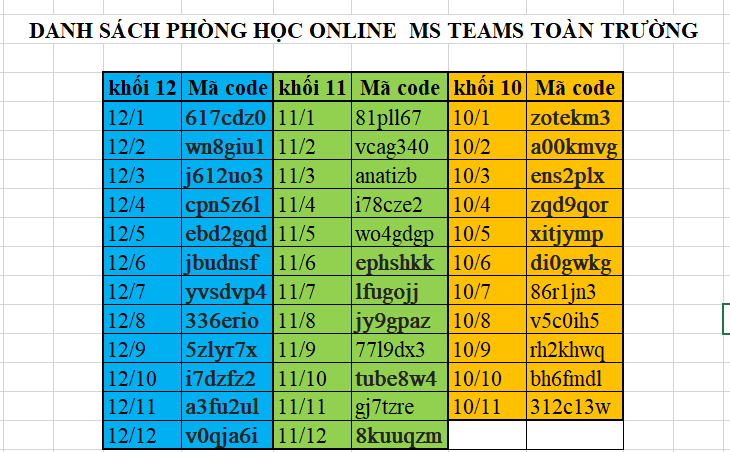
<div style="text-align: justify;"><span style="font-size:12pt"><span style="line-height:107%"><span style="font-family:&#039;Times New Roman&#039;,serif"><b><span style="font-size:14.0pt"><span style="line-height:107%">&nbsp; &nbsp;Bước 5:</span></span></b><span style="font-size:14.0pt"><span style="line-height:107%"> Vào phòng: Xem hình bên dưới để biết mã code của lớp học. Sau đó bấm vào <b>Tham gia hoặc tạo nhóm </b>-&gt; màn hình xuất hiện 2 bảng, chọn <strong>tham gia nhóm bằng mã</strong>, tại đó <strong>nhập mã</strong> vào và bấm <b>&nbsp;tham gia nhóm.</b></span></span></span></span></span>

<div class="image-center"><img alt="" height="425" src="https://thptdodangtuyen.edu.vn/uploads/news/2021_08/ma-lop-2.png" width="687" /></div>
<br />
<span style="font-size:12pt"><span style="line-height:107%"><span style="font-family:&#039;Times New Roman&#039;,serif"><b><span style="font-size:14.0pt"><span style="line-height:107%">II/ Tham gia học: </span></span></b></span></span></span><br />
<span style="font-size:12pt"><span style="line-height:107%"><span style="font-family:&#039;Times New Roman&#039;,serif"><b><span style="font-size:14.0pt"><span style="line-height:107%">&nbsp; &nbsp; &nbsp; &nbsp; 1. Cách tiếp cận buổi học</span></span></b></span></span></span><br />
<span style="font-size:12pt"><span style="line-height:107%"><span style="font-family:&#039;Times New Roman&#039;,serif"><span style="font-size:14.0pt"><span style="line-height:107%">&nbsp; &nbsp; &nbsp; &nbsp; &nbsp;Khi chúng ta đã vào phòng của lớp rồi thì trên giao diện MS teams của chúng ta đã có lớp, ví dụ 10/1.</span></span></span></span></span><br />
<span style="font-size:12pt"><span style="line-height:107%"><span style="font-family:&#039;Times New Roman&#039;,serif"><span style="font-size:14.0pt"><span style="line-height:107%">Tại lớp 10/1 có tất cả thành viên gồm GVBM, GVCN, thành viên của lớp, có hệ thống kênh môn toán, lý-cn, hóa….</span></span></span></span></span><br />
<span style="font-size:12pt"><span style="line-height:107%"><span style="font-family:&#039;Times New Roman&#039;,serif"><span style="font-size:14.0pt"><span style="line-height:107%">Ví dụ hôm nay lịch học&nbsp; là</span></span></span></span></span><br />
<span style="font-size:12pt"><span style="line-height:107%"><span style="font-family:&#039;Times New Roman&#039;,serif"><span style="font-size:14.0pt"><span style="line-height:107%">&nbsp;&nbsp;&nbsp;&nbsp;&nbsp;&nbsp;&nbsp;&nbsp;&nbsp; + 7h đến 7h30 là toán</span></span></span></span></span><br />
<span style="font-size:12pt"><span style="line-height:107%"><span style="font-family:&#039;Times New Roman&#039;,serif"><span style="font-size:14.0pt"><span style="line-height:107%">&nbsp;&nbsp;&nbsp;&nbsp;&nbsp;&nbsp;&nbsp;&nbsp;&nbsp; + 7h40 đến 8h10 là lý</span></span></span></span></span><br />
<span style="font-size:12pt"><span style="line-height:107%"><span style="font-family:&#039;Times New Roman&#039;,serif"><span style="font-size:14.0pt"><span style="line-height:107%">&nbsp;&nbsp;&nbsp;&nbsp;&nbsp;&nbsp;&nbsp;&nbsp;&nbsp; + …….</span></span></span></span></span><br />
<span style="font-size:12pt"><span style="line-height:107%"><span style="font-family:&#039;Times New Roman&#039;,serif"><span style="font-size:14.0pt"><span style="line-height:107%">&nbsp; &nbsp;Thì trước 7h giáo viên toán sẽ vào kênh toán mở lớp, học sinh vào sẽ thấy bên cạnh kênh môn toán có máy quay hiện lên <span style="color:rgb(52, 152, 219);">màu xanh dương</span>, học sinh kích vào đó bấm tham gia vào học.</span></span></span></span></span><br />
<span style="font-size:12pt"><span style="line-height:107%"><span style="font-family:&#039;Times New Roman&#039;,serif"><span style="font-size:14.0pt"><span style="line-height:107%">&nbsp; &nbsp;Gần đến 7h30 kết thúc buổi học giáo viên toán yêu cầu học sinh rời phòng thì các em rời phòng nhưng không thoát hệ thống.</span></span></span></span></span><br />
<span style="font-size:12pt"><span style="line-height:107%"><span style="font-family:&#039;Times New Roman&#039;,serif"><span style="font-size:14.0pt"><span style="line-height:107%">&nbsp; &nbsp;Đến khoản trước 7h40 giáo viên lý sẽ vào kênh môn lý bấm vào dạy, tương tự học sinh sẽ thấy máy quay <span style="color:rgb(52, 152, 219);">màu xanh</span> và vào học….</span></span></span></span></span></div>

<h2 style="text-align: justify;"><span style="font-size:18pt"><span style="background:white"><span style="font-family:&#039;Times New Roman&#039;,serif">&nbsp;&nbsp;&nbsp;&nbsp;&nbsp;<strong><span style="font-size:14.0pt">2. Lưu ý:</span></strong></span></span></span></h2>

<h2 style="text-align: justify;"><span style="font-size:18pt"><span style="background:white"><span style="font-family:&#039;Times New Roman&#039;,serif">&nbsp;&nbsp;&nbsp;&nbsp;&nbsp;&nbsp;&nbsp;&nbsp;&nbsp; <span style="font-size:14.0pt"><span style="font-weight:normal">- Khi vào lớp học phải tắt micro và luôn luôn bật camera để giáo viên quan sát, khi cần trao đổi với thầy cô thì bấm vào biểu tưởng bàn tay để xin phát biểu, giáo viên cho phát biểu thì học sinh mới bật mic lên phát biểu.</span></span></span></span></span></h2>

<h2 style="text-align: justify;"><span style="font-size:18pt"><span style="background:white"><span style="font-family:&#039;Times New Roman&#039;,serif"><span style="font-size:14.0pt"><span style="font-weight:normal">&nbsp;&nbsp;&nbsp;&nbsp;&nbsp;&nbsp;&nbsp;&nbsp;&nbsp; - Thực hiện các yêu cầu mà giáo viên đưa ra.</span></span></span></span></span></h2>

<h2 style="text-align: justify;"><span style="font-size:18pt"><span style="background:white"><span style="font-family:&#039;Times New Roman&#039;,serif"><span style="font-size:14.0pt"><span style="font-weight:normal">&nbsp;&nbsp;&nbsp;&nbsp;&nbsp;&nbsp;&nbsp;&nbsp;&nbsp; - Tại các kênh môn sau khi học xong thì có lưu lại vi deo, các em có thể mở lại để xem nếu cần,</span></span></span></span></span></h2>

<h2 style="text-align: justify;"><span style="font-size:18pt"><span style="background:white"><span style="font-family:&#039;Times New Roman&#039;,serif"><span style="font-size:14.0pt"><span style="font-weight:normal">&nbsp;&nbsp;&nbsp;&nbsp;&nbsp;&nbsp;&nbsp;&nbsp;&nbsp; - Sau buổi học hệ thống tự động lưu lại quá trình học gồm bao nhiêu học sinh, vào hay ra lúc mấy giờ (GVCN căn cứ vào danh sách này để thông báo cho phụ huynh).</span></span></span></span></span></h2>

<h2 style="text-align: justify;"><span style="font-size:18pt"><span style="background:white"><span style="font-family:&#039;Times New Roman&#039;,serif"><span style="font-size:14.0pt"><span style="font-weight:normal">&nbsp;&nbsp;&nbsp;&nbsp;&nbsp;&nbsp;&nbsp;&nbsp;&nbsp; - Không cung cấp tài khoản và mật khẩu cho người khác, nếu để làm ảnh hưởng đến GV, đến lớp thì học sinh có tài khoản đó phải chịu mọi hình thức kỉ luật của nhà trường.</span></span></span></span></span></h2>

<h2 style="text-align: justify;"><span style="font-size:18pt"><span style="background:white"><span style="font-family:&#039;Times New Roman&#039;,serif"><span style="font-size:14.0pt"><span style="font-weight:normal">&nbsp;&nbsp;&nbsp;&nbsp;&nbsp;&nbsp;&nbsp;&nbsp;&nbsp; - Khi đăng nhập tài khoản nếu gặp trục trặc gì thì lên hệ zalo 0976306757 gặp thầy Giang hoặc&nbsp; messenger Trần Minh Giang để điều chỉnh. Lưu ý danh sách tài khoản được cung cấp theo danh sách được niên yết trên website nhà trường, các trường hợp chuyển lớp khi nào đi học lại sẽ bổ sung sau.</span></span></span></span></span></h2>

<h2><span style="font-size:18pt"><span style="background:white"><span style="font-family:&#039;Times New Roman&#039;,serif"><span style="font-size:14.0pt"><span style="font-weight:normal">&nbsp;&nbsp;&nbsp;&nbsp;&nbsp;&nbsp;&nbsp;&nbsp;&nbsp; - Phải hoàn thành việc tham gia vào lớp trước ngày 30/8/2022.</span></span></span></span></span></h2>

<h2 style="text-align: justify;"><span style="font-size:18pt"><span style="background:white"><span style="font-family:&#039;Times New Roman&#039;,serif">&nbsp;&nbsp;&nbsp;&nbsp;&nbsp;&nbsp;&nbsp;&nbsp;&nbsp;&nbsp;&nbsp;&nbsp;&nbsp;&nbsp;&nbsp;&nbsp;&nbsp;&nbsp;&nbsp;&nbsp;&nbsp;&nbsp;&nbsp;&nbsp;&nbsp;&nbsp;&nbsp;&nbsp;&nbsp;&nbsp;&nbsp;&nbsp;&nbsp;&nbsp;&nbsp;&nbsp;&nbsp;&nbsp;&nbsp;&nbsp;&nbsp;&nbsp;&nbsp;&nbsp;&nbsp;&nbsp;&nbsp;&nbsp;&nbsp;&nbsp;&nbsp;&nbsp;&nbsp;&nbsp;&nbsp;&nbsp;&nbsp;&nbsp;&nbsp;&nbsp;&nbsp;&nbsp;&nbsp;&nbsp;&nbsp;&nbsp; <strong><span style="font-size:14.0pt">BGH</span></strong></span></span></span></h2>
		</div>
				<div id="author">
						<p>
				<strong>Tác giả:</strong>
				<a href="https://thptdodangtuyen.edu.vn/author/admin123/">admin123</a>
			</p>
		</div>
	</div>
	<div id="footer" class="clearfix">
		<div id="url">
			<strong>URL của bản tin này: </strong><a href="https://thptdodangtuyen.edu.vn/savefile/tin-nha-truong/huong-dan-hoc-sinh-dang-nhap-va-hoc-online-bang-ms-teams-46.html" title="TÀI KHOẢN VÀ HƯỚNG DẪN HỌC SINH HỌC ONLINE BẰNG MS TEAMS">https://thptdodangtuyen.edu.vn/savefile/tin-nha-truong/huong-dan-hoc-sinh-dang-nhap-va-hoc-online-bang-ms-teams-46.html</a>

		</div>
		<div class="clear"></div>
		<div class="copyright">
			&copy; Trường THPT  Đỗ Đăng Tuyển
		</div>
		<div id="contact">
			<a href="mailto:webmaster@thptnguyentrai.my">webmaster@thptnguyentrai.my</a>
		</div>
	</div>
</div>
        <div id="timeoutsess" class="chromeframe">
            Bạn đã không sử dụng Site, <a onclick="timeoutsesscancel();" href="https://thptdodangtuyen.edu.vn/#">Bấm vào đây để duy trì trạng thái đăng nhập</a>. Thời gian chờ: <span id="secField"> 60 </span> giây
        </div>
        <div id="openidResult" class="nv-alert" style="display:none"></div>
        <div id="openidBt" data-result="" data-redirect=""></div>
<script src="https://thptdodangtuyen.edu.vn/assets/js/jquery/jquery.min.js"></script>
<script>var nv_base_siteurl="/",nv_lang_data="vi",nv_lang_interface="vi",nv_name_variable="nv",nv_fc_variable="op",nv_lang_variable="language",nv_module_name="news",nv_func_name="savefile",nv_is_user=0, nv_my_ofs=-4,nv_my_abbr="EDT",nv_cookie_prefix="nv4",nv_check_pass_mstime=1738000,nv_area_admin=0,nv_safemode=0,theme_responsive=1,nv_recaptcha_ver=2,nv_recaptcha_sitekey="",nv_recaptcha_type="image";</script>
<script src="https://thptdodangtuyen.edu.vn/assets/js/language/vi.js"></script>
<script src="https://thptdodangtuyen.edu.vn/assets/js/global.js"></script>
<script src="https://thptdodangtuyen.edu.vn/themes/thptnt/js/news.js"></script>
<script src="https://thptdodangtuyen.edu.vn/themes/thptnt/js/main.js"></script>
<script src="https://thptdodangtuyen.edu.vn/themes/thptnt/js/custom.js"></script>
<script type="application/ld+json">
        {
            "@context": "https://schema.org",
            "@type": "Organization",
            "url": "https://thptdodangtuyen.edu.vn",
            "logo": "https://thptdodangtuyen.edu.vn/uploads/logo_thpt.png"
        }
        </script>
<script src="https://thptdodangtuyen.edu.vn/themes/thptnt/js/bootstrap.min.js"></script>
</body>
</html>